
What does “camera monitored” mean when you’re choosing camera monitored storage units? Cameras can help make activity around a facility visible, but they don’t prevent every incident or protect belongings on their own. The term also doesn’t necessarily mean someone is watching live.
Storage security works in layers. A gate defines an entry point, cameras provide visibility around the facility, and a lock secures your individual unit. Your own storage habits matter too. This guide explains what each layer can and can’t do, how to assess security information and practical steps to help protect the items you store.
SafeHouse Storage offers self-managed, gated and camera-monitored facilities, with small, medium and large units in Murray Bridge, Tenterfield, Lithgow and Coonabarabran. Understanding the role of each security layer can help you choose a storage option that suits your needs, without assuming cameras mean someone is watching every moment.
Key Takeaways
- Learn what “camera-monitored” means at a storage facility, and why it doesn’t automatically mean someone is watching live.
- See how gates, cameras and your own unit lock each play a different part in securing camera monitored storage units.
- Separate what cameras may help with from what they can’t guarantee, so you can judge security information realistically.
- Use a short checklist to understand access arrangements and camera monitoring before choosing a storage unit.
- Explore SafeHouse Storage’s self-managed, gated and camera-monitored options in Murray Bridge, Tenterfield, Lithgow and Coonabarabran.
What Are Camera-Monitored Storage Units, and What Does the Term Mean?
“Camera-monitored” means cameras are used to monitor areas of a storage facility. They may cover shared or entry areas, helping make activity around the premises visible. The term describes the use of cameras, but doesn’t specify their position or how the system operates.
Closed-circuit television (CCTV) is a common term for camera systems that send video to a limited set of monitors or recording devices. At a storage facility, cameras are one part of a wider security setup. They can make activity easier to observe, but their presence doesn’t mean every part of the site is covered or that incidents can’t happen.
It’s useful to distinguish the camera from what happens to its footage. “Monitored” alone doesn’t say whether a person watches the video live, whether footage is recorded, how long it’s kept or what happens if something concerning is seen. Don’t assume any of those arrangements from the label alone.
How Is Camera-Monitored Storage Different from Live Monitoring?
A camera can capture activity without anyone watching its feed at that moment. Live monitoring means someone observes video in real time. These are different arrangements, and “camera-monitored” by itself doesn’t establish that a live response service is in place. Treat camera presence as visibility, not proof of continuous observation or immediate intervention.
Why Do Storage Facilities Use Cameras?
Visible cameras can help keep activity around a facility in view. If footage is recorded and retained, it may support a later review of an event, depending on how the system is set up. For example, footage might help establish what happened near an entry area, but it may not show activity inside a locked unit. Coverage, recording and access to footage vary, so don’t assume every event will be captured.
For renters comparing camera monitored storage units, this distinction makes security information easier to assess. Cameras can provide a visual record or a way to observe activity, but they don’t lock a unit, control access or secure belongings by themselves. Those jobs involve other layers, including the facility’s entry arrangements and the lock on your own unit.
Cameras can help make activity visible; they don’t guarantee prevention, live attention or a particular outcome. Their role is most useful to understand as one part of a broader approach to storage security, alongside gated access and the steps you take to secure your unit and belongings.
How Camera Monitoring Works Alongside Gates and Unit Locks
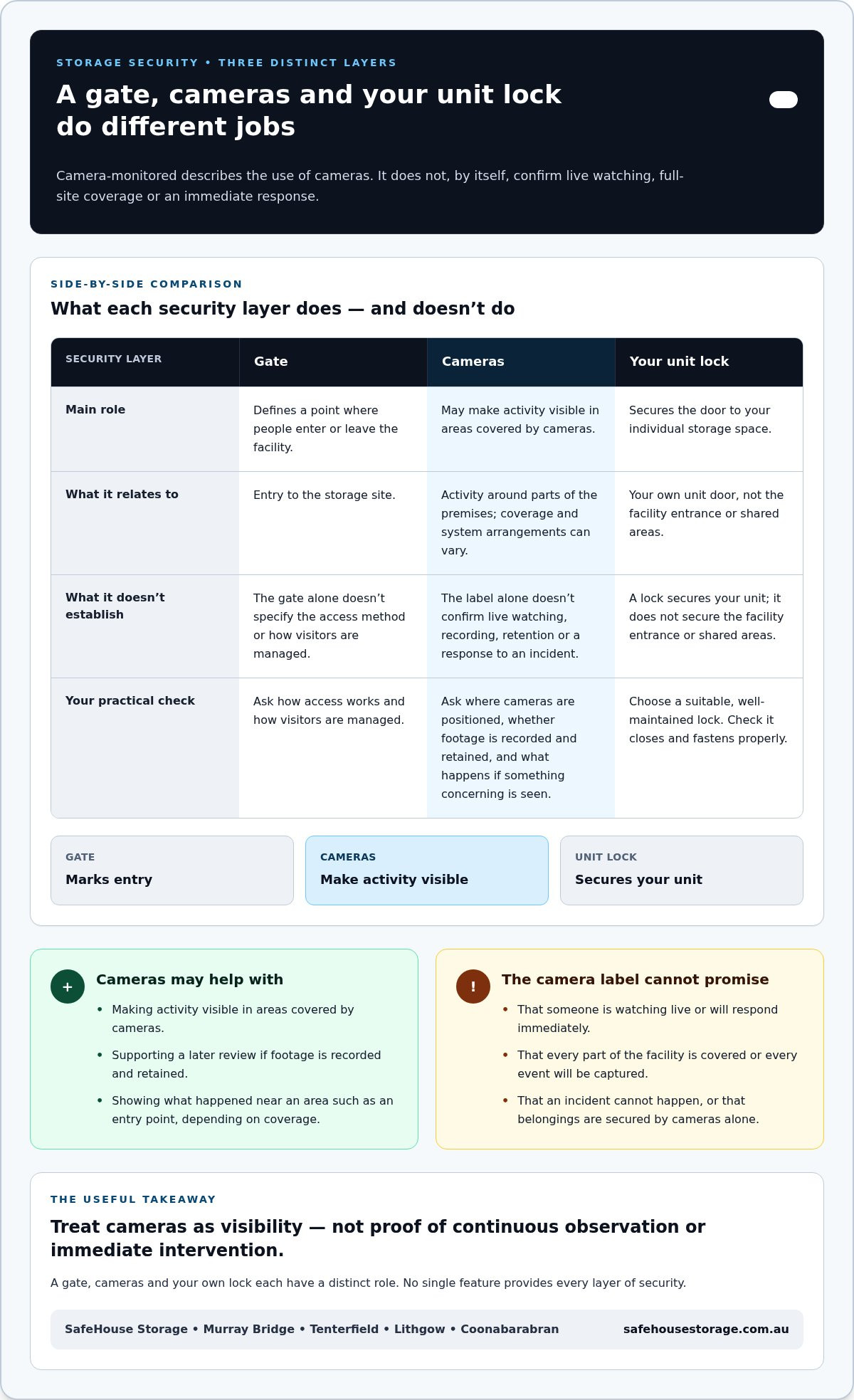
Think of storage security as separate layers, not one feature doing every job. The gate marks an entry point to the facility. Cameras can make activity around the site visible. Your lock secures the door to your individual unit. Each layer has a different role, and a gap in one isn’t automatically covered by another.
When comparing camera monitored storage units, separate facility features from the steps you control yourself:
- Site entry: A gate defines a point through which people enter or leave the facility.
- Activity visibility: Cameras may help show activity in areas of the premises. Their presence alone doesn’t explain whether anyone watches live or what happens to footage.
- Your unit: A suitable, well-maintained lock helps secure the door to your own storage space.
For example, if someone enters through the gate, the gate and cameras serve different purposes. The gate marks the entry point, while cameras may help make activity visible. Neither one locks your storage unit, so your own lock remains an important part of the arrangement.
What Does Gated Access Add to Camera Monitoring?
A gate creates a defined point of entry to the facility. It’s a physical layer that helps separate the storage site from the surrounding area. Cameras serve a different role by making activity around parts of the premises visible. Together, they address different parts of the site setup: the gate marks where entry happens, while cameras may help show activity. The gate’s presence doesn’t by itself specify an access method or how visitors are managed.
What Role Does Your Storage Unit Lock Play?
Your lock secures the individual unit door, rather than the facility entrance or shared areas. Choose one that suits the unit’s locking point and keep it in good working order. Check that it closes and fastens properly whenever you secure the door. The lock is your own practical layer, so don’t rely on cameras or a site gate to secure the unit itself.
No single feature provides every layer of security. A gate, cameras and your unit lock each have a distinct job. Understanding those roles helps you set realistic expectations and identify the steps you can take as a renter.
SafeHouse Storage facilities are gated and camera-monitored, with a self-managed setup. If you’re exploring storage in Murray Bridge, Tenterfield, Lithgow or Coonabarabran, view local storage options and consider which unit size suits what you plan to store.
What Camera-Monitored Storage Can and Cannot Promise
Camera monitoring can contribute to a facility’s security, but it isn’t the same as risk-free storage. The word “monitored” doesn’t tell you whether a person watches cameras live, whether footage is recorded or retained, or whether anyone will respond to an incident. Those details depend on the system and its arrangements.
Use this comparison to separate possible benefits from assumptions the camera label can’t support:
Cameras may help with
- Making activity visible in areas covered by cameras.
- Providing footage that may support a later review, if the system records and retains it.
- Adding a layer of visibility alongside other facility security features.
Cameras cannot guarantee
- That every part of the facility or every event is captured.
- That someone is watching a live feed or will intervene immediately.
- That belongings will never be damaged, lost or taken.
- That footage exists, remains available for a particular period or will show a specific incident clearly.
The difference is between a feature that may help and an outcome no feature can promise. A camera might provide useful information about activity in its view. It can’t, on its own, prevent every incident or ensure a particular result. Weigh camera coverage as one part of a broader security picture, not as a guarantee.
Do Cameras Prevent Theft or Guarantee Your Belongings Are Safe?
No camera system can make stored belongings theft-proof. Cameras may support visibility, but security also depends on facility features and the steps you take yourself, such as securing your unit with a suitable lock. Consider what each layer does rather than relying on a single feature to remove all risk.
What Should Renters Avoid Assuming About Camera Coverage?
Don’t assume every part of a facility is in view, that footage is watched live or that recordings are kept for a set time. Camera positions, recording arrangements and access to footage can differ. The wording describes camera monitoring, not necessarily the level of coverage or response.
A camera-monitoring claim means cameras are used to monitor areas of a facility; it doesn’t, by itself, promise full coverage, live observation or a guaranteed response. Keep that distinction in mind as you compare camera monitored storage units. It helps you judge the feature on its actual role while recognising its value as one layer of security.
SafeHouse Storage’s facilities are gated and camera-monitored. These features describe parts of the facility setup, not a promise that incidents cannot occur or that cameras are watched live. Understanding what cameras can and can’t do helps you set sensible expectations and consider the security steps within your control.
How to Assess Camera-Monitored Storage Before You Rent
Before signing an agreement, look beyond the camera label. A short review can help you understand the security setup, choose a unit that fits your belongings and plan how you’ll use the space. Work through this checklist:
- Understand the camera claim. Read what the facility says about camera monitoring. The wording alone doesn’t establish live observation, recording or a response to an incident.
- Review gated access. Read the access details in the rental information so you understand what the gate does and how entry is described.
- Plan for your unit’s lock. Check how the individual unit door is secured, then choose a suitable, well-maintained lock.
- Match the unit to your belongings. List the type and amount of items you’ll store, rather than choosing a size based only on camera or gate features.
- Think about your visits. Consider how often you expect to access your belongings and plan around the facility’s stated arrangements.
Keep the layers distinct as you compare camera monitored storage units. A gate relates to entry, cameras may make activity visible, and your lock secures your unit. Facility information and the rental agreement help you understand the practical arrangements. Clear details make it easier to set expectations before you commit.
Which Security Questions Help You Compare Storage Options?
Focus on what the information actually says. What does “camera-monitored” mean in practice? How is gated access described? How do renters secure their own unit? These questions help separate stated features from assumptions, without treating camera presence as proof of live surveillance or a guaranteed response. For wider local context, explore this regional self-storage security guide.
How Should Your Storage Needs Shape the Decision?
Start with what you plan to store. A few household items may need a different amount of space from the contents of several rooms, so take stock before settling on a unit size. SafeHouse Storage offers small, medium and large units for different storage needs. Then consider how often you’ll visit. A unit you access regularly may call for a different plan from one holding belongings you won’t need often.
If you’re storing items during a move, planning ahead can make the transition simpler. This regional moving and storage guide offers more context for organising storage around a move.
SafeHouse Storage’s self-managed facilities are gated and camera-monitored. To explore unit options and arrange storage, view SafeHouse Storage options.
Camera-Monitored SafeHouse Storage in Regional NSW and SA
For renters in regional NSW and South Australia, SafeHouse Storage offers a straightforward self-managed storage option. Its facilities are unmanned, gated and camera-monitored. You manage your stored belongings, while the facility’s gates and cameras form part of its security features. Camera monitoring is one layer, not a promise that incidents cannot happen.
SafeHouse Storage serves Murray Bridge in South Australia, and Tenterfield, Lithgow and Coonabarabran in NSW. Choosing a nearby town can make planning storage around a household change, work needs or a move more practical. The right location and unit size depend on what you need to store and how you plan to use the space.
Small, medium and large units offer different amounts of room for different storage needs. A household might need space for furniture or belongings during a change at home. A business may need to store items or equipment that aren’t used every day. Start by listing what you intend to store, then estimate how much room it may take up. A clear inventory can help you choose a unit size that fits the job, rather than focusing on security features alone.
What Is the SafeHouse Storage Setup Like?
The facilities are unmanned, gated and camera-monitored. With self-managed storage, you take responsibility for organising and managing the belongings you place in your unit. The gate and cameras are facility features, while your own unit lock is part of how you secure your space. Camera monitoring doesn’t mean live watching or a guaranteed response. Keeping these roles clear helps you understand the setup and its limits.
How Can You Take the Next Step in Your Area?
Once you’ve worked out what needs storing and roughly how much room it may take, explore the options in your nearest SafeHouse Storage town. You can arrange a unit through an online agreement or get assistance from a local real estate partner. Either route gives you a practical way to move from planning to arranging storage.
If you’re comparing camera monitored storage units in regional NSW or SA, consider the location, unit size and self-managed arrangement together. Matching these basics to your belongings can help you make a considered choice. Explore SafeHouse Storage options in Murray Bridge, Tenterfield, Lithgow or Coonabarabran when you’re ready to take the next step.
Make Your Storage Plan Work for You
Turn your storage needs into a simple plan. List what you’re putting away, what you may need to reach first and how storage fits around your next few weeks or months. Grouping items by how often you’ll need them can make it easier to find things later. Keep an inventory somewhere separate from the stored goods.
As you consider camera monitored storage units, focus on practical fit as well as security information. Clear expectations help you choose with confidence and avoid relying on a camera label to answer questions it can’t resolve. Take time to review the option that suits your circumstances.
SafeHouse Storage offers self-managed storage options across regional NSW and SA. Explore storage options near you in Murray Bridge, Tenterfield, Lithgow or Coonabarabran.
Frequently Asked Questions
Are camera-monitored storage units watched live?
Not necessarily. The phrase “camera-monitored” doesn’t by itself mean someone is watching a live feed. Read the facility information for details about live viewing, recording and footage access. If those details aren’t explained, don’t assume a live operator is present. This distinction matters when comparing camera monitored storage units based on the level of oversight you expect.
Do cameras guarantee that belongings in storage will not be stolen?
No. Cameras can’t guarantee that belongings won’t be stolen, damaged or affected by another incident. Use a suitable lock and check whether your insurance covers goods kept in a storage unit. For example, home contents cover may treat items stored away from your home differently. Review the policy wording and keep a record of what you store, especially for higher-value items.
What happens if there is an incident at a camera-monitored storage facility?
The steps depend on the facility’s arrangements and whether relevant footage was recorded and retained. If you notice a problem, note the date, approximate time and what you found. Report it through the facility’s stated contact route and keep a copy of any messages. If you suspect a crime, you can also contact the police. Don’t assume footage will be available or that a camera guarantees a particular response.
Can I still use my own lock with camera-monitored storage?
Renters secure their individual unit with a lock, and the door’s locking point matters. Choose a lock that fits the unit properly and closes securely without forcing the latch. Keep the key or combination somewhere safe, and test the lock after securing the door. For a SafeHouse Storage unit, follow the information provided for your specific unit when arranging storage.
Is unmanned storage less secure than a staffed facility?
Not automatically. Staffed and unmanned sites have different operating setups, so compare their actual security features and arrangements rather than assuming staff presence guarantees greater security. Consider gated entry, camera information, your unit lock and how you’ll manage visits. SafeHouse Storage is self-managed, so renters take an active role in organising and securing their belongings at facilities serving Murray Bridge, Tenterfield, Lithgow and Coonabarabran.
What should I do before storing valuable belongings?
Make an itemised list, photograph valuable goods and note identifying details such as serial numbers. Check your insurance policy for limits, exclusions and any requirements for items kept away from home. Pack important documents so they’re protected and easy to locate, and consider whether irreplaceable items belong in storage at all. Before you leave, confirm the unit is locked and keep your inventory somewhere separate from the stored goods.


